Account security, disconnecting Google Ads, and your data
How the code-level Budget Firewall protects your budgets and bids, what CallWarden can and can't do in Google Ads, how to disconnect or revoke access in one click, how to invite your team and who can do what, and how to get your data deleted.
Checked against the product on · 6 min read
The Budget Firewall
Google’s Ads permission is all-or-nothing: a token that can pause a campaign could also change its budget. So CallWarden limits itself. Every request to Google passes a short allowlist before it is sent, and anything outside it is refused with an error on our side, never a change on yours. The allowed writes are exactly three: rating a lead, replying to a message lead, and setting a Local Services campaign’s status to Paused or Enabled (never Removed). An automated test proves that budgets, bidding, targeting, ads and Google’s catch-all change endpoint are blocked, and it runs on every change to our code. The full description is on the Security page.
Disconnecting Google Ads
- Settings > Google Ads connections > Disconnect (owners and admins).
- Monitoring of that login’s accounts stops immediately. The connection stays listed as Disconnected, because those accounts’ history belongs to it; a connection that served no account is removed from the list instead.
- If it was your last active connection, CallWarden also revokes its Google permission, so the token can’t be used again. Google revokes access for a login all at once.
- Your history and settings stay, so reconnecting later picks up where you left off. Reconnecting moves the accounts to the new connection and clears the old one from the list.
An old disconnected connection with no accounts left shows a Remove button. CallWarden also clears these on its own once a day, so the list doesn’t grow.
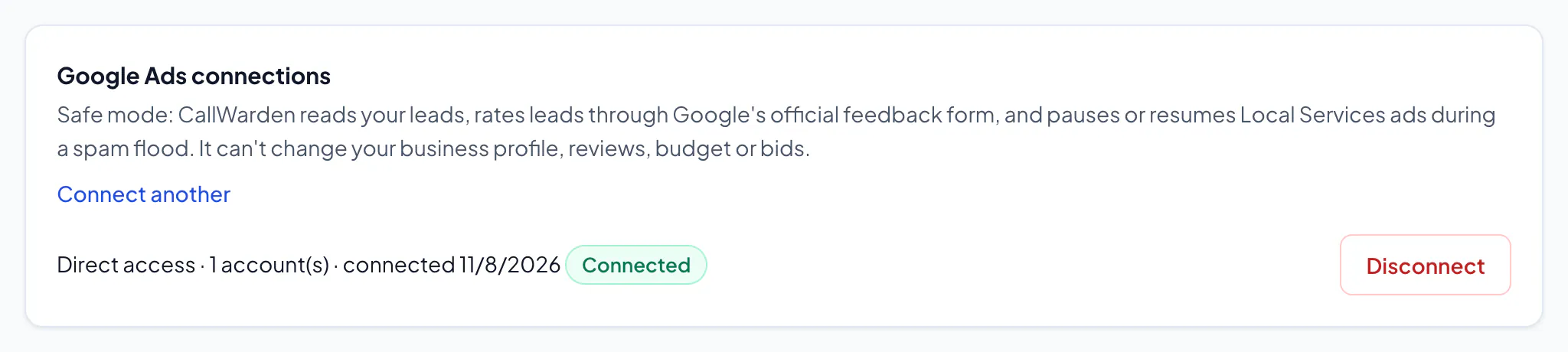
- This Google login is connected and its accounts are being checked.
- Disconnect stops monitoring. When it’s your last connection, CallWarden also revokes its Google permission.
- Connect another adds a different Google login, such as an agency manager account.
You can also remove CallWarden from Google’s side at any time in your Google Account third-party access. CallWarden then shows “Reconnect needed”.
Who can do what
| Role | Can |
|---|---|
| Owner and Admin | Everything: connect and disconnect Google Ads, change the plan and billing, Spam Shield settings, Autopilot, channels, approve claims, and invite and manage the team. |
| Member | Approve claims, resume paused campaigns, copy evidence packs, send feedback. Can’t change settings, connections, billing or the team. |
| Bookkeeper | View only, plus the monthly statement and reconciliation report. |
Owners can change anyone’s role, including making someone else an owner. Admins can move people between Admin, Member and Bookkeeper, but can’t change an owner. Owners can remove anyone; admins can remove members and bookkeepers. A business always keeps at least one owner, so make someone else an owner before the last one leaves.
Inviting your team
Everyone signs in with their own Google account, so you never share a login. There’s no charge per person: adding teammates never adds a business or changes your price.
- Open Settings › Team (also in the account menu) and enter your teammate’s email address and role.
- They get an email with a link. It works once, for 7 days, and only for the Google account with that email address.
- They click it and sign in with Google. They join your business instead of starting a new one, and land on your overview.
Waiting invites are listed on the Team page, where you can resend one (the old link stops working) or withdraw it. If a teammate signs in before opening the email, CallWarden shows the invite waiting for them.
Colleagues on Google Workspace
If your company uses Google Workspace, colleagues can find your business themselves. When someone signs in with an account at your Workspace domain (for example @acmeplumbing.com), CallWarden offers “Ask to join” instead of a new business. Owners and admins get an email, then approve (choosing the role) or decline on the Team page, and the person gets an email once they’re in.
- It’s on for a business created with a Workspace account, and an owner or admin can turn it off (or on, for their own domain) on the Team page.
- Google confirms the domain at sign-in, so personal Gmail accounts and other companies can’t ask. Nobody joins without an owner’s or admin’s approval.
- A declined request stays declined. You can still invite that person by email.
More than one business
One Google account can belong to several businesses, for example an office manager who works for two companies. Switch between them from the account menu at the top right; each business keeps its own data, roles and settings.
Removing someone, or leaving
Removing a teammate on the Team page takes away their access to that business right away. Their Audio Bridge for that business is disconnected and their alert preferences there are deleted. Claims they approved and the business’s history stay. Anyone can leave a business from the same page.
Sign-in security
- There is no CallWarden password. You sign in with Google, so Google’s 2-step verification protects your account.
- Sessions are stored as one-way fingerprints and expire. Sign out from the account menu ends the session on that device.
- Your Google connection token is encrypted with AES-256-GCM and bound to your business. Google access tokens are kept in memory only, for under an hour.
Your data
To get a copy of your data, correct it, or delete your account, email [email protected] from the address on your account. Deletion is complete within 30 days, except billing records we must keep for tax and accounting. The Privacy Policy has the full list of what we collect and who processes it for us.
Reporting a security problem
Email [email protected] with what you found. We confirm receipt and keep you posted until it’s fixed. Please don’t test against other customers’ accounts.
Frequently asked
How do I add my office manager or bookkeeper?
Settings > Team: enter their email address and pick a role. They get a link that works for 7 days for the Google account with that address, and they join your business instead of creating a new one. If your company uses Google Workspace, colleagues can also ask to join when they sign in, and you approve them on the same page. There's no charge per person.
Could CallWarden change my budget or bids, even by mistake?
No. Every request to Google passes a short allowlist in our code before it is sent. Budgets, bids, targeting, ads and Google's catch-all change endpoint are refused, and an automated test proves it on every code change.
How do I stop CallWarden's access to Google Ads?
Settings > Google Ads connections > Disconnect. Monitoring stops immediately, and when it was your last connection CallWarden revokes its Google permission. You can also remove CallWarden in your Google Account's third-party access page.
How do I delete my account and data?
Email [email protected] from the address on your account. We delete your data within 30 days, except billing records we must keep for tax and accounting.
Still stuck?
Email us and an engineer replies within one business day. Include the lead ID or the Google Ads account name and we can look at exactly what happened.