Co-Pilot vs. Autopilot: who presses send on a credit claim
In Co-Pilot you approve each claim, in the app or from a one-tap link in email, Slack, Microsoft Teams or Discord. Autopilot sends high-confidence claims itself. What Google answers, and what Day-28 packs are for.
Checked against the product on · 6 min read
Co-Pilot
After the 24-hour hold, each flagged lead waits in “Awaiting approval”. The Overview and Settings show how many are waiting, with “Approve all & send to Google” for the lot, and the Leads page lets you approve one at a time with the evidence in front of you. Owners, admins and members can approve; bookkeepers can only view.
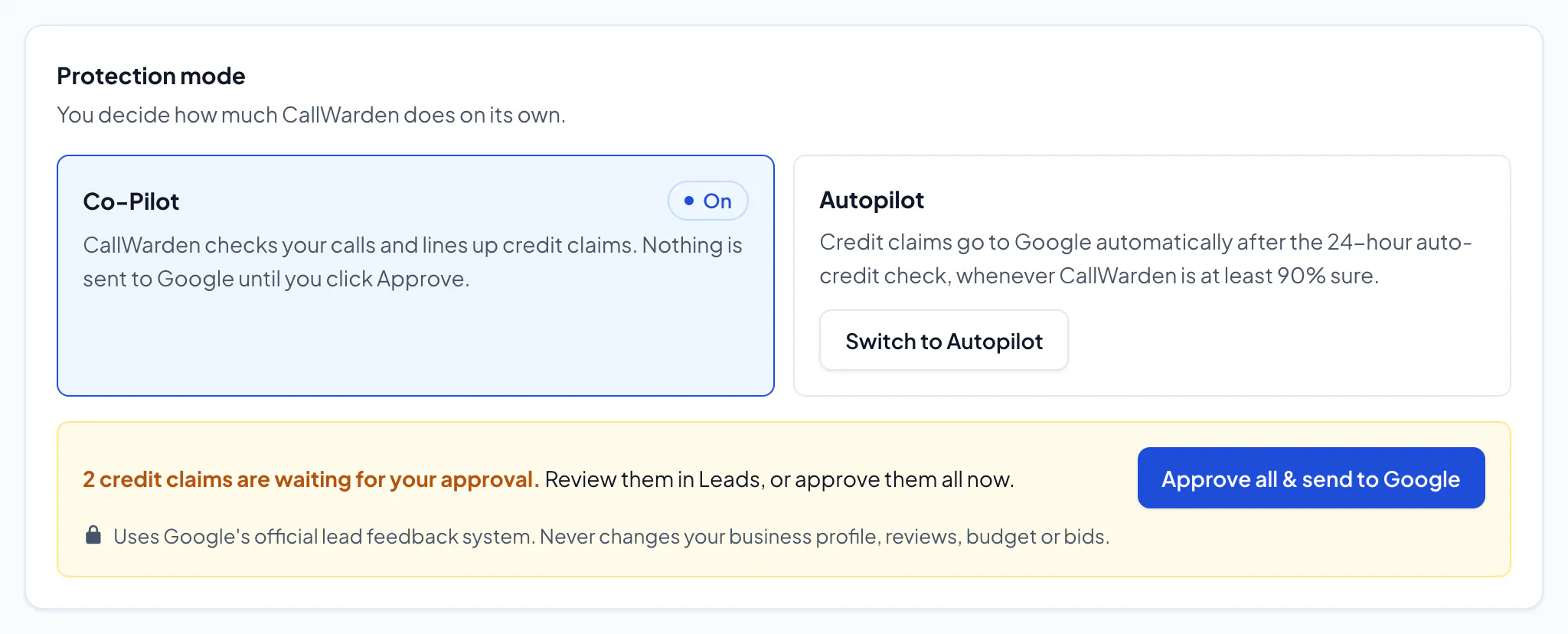
- Co-Pilot is on: nothing goes to Google until you approve it.
- Switch to Autopilot to send claims at or above your confidence threshold without waiting for you.
- Approve all & send to Google sends every claim that’s waiting, in one click. To go one at a time, open each lead from the Leads page.
One-tap approvals from alerts
| Where the alert arrives | Who can act | What the link can do |
|---|---|---|
| The person it was sent to | Approve the claim, copy a Day-28 pack, open the lead. Billing stays in the app. | |
| Slack, Microsoft Teams, Discord | Anyone in the channel | Approve the claim, copy a Day-28 pack, resume paused campaigns. Links expire within 24 hours and stop working if the channel is removed. |
| Phone push (ntfy) | You | Opens the dashboard; no action links, since ntfy topics aren’t private. |
Every link opens a confirmation page first. Nothing happens from just opening it, so a preview in a chat app can’t approve anything.
Autopilot
Turn it on in Settings > Protection mode. Claims whose confidence meets your threshold are sent automatically once the hold has passed; the rest still wait for you. Autopilot also sends good-lead ratings on long calls with booking intent, which trains Google’s Smart Bidding (Shield and Agency). Switch back to Co-Pilot at any time; claims already sent can’t be recalled.
What Google answers
| Google’s answer on the lead | Meaning |
|---|---|
| Approved: credit on its way | Google accepted the rating. The credit lands on your Google Ads invoice in about two months. |
| Approved: you’ve reached Google’s credit limit for now | Accepted, but Google caps credits per period. CallWarden keeps watching the lead. |
| Declined: Google’s credit limit reached | Google won’t credit more this period. On Shield and Agency the lead moves to a Day-28 pack. |
| Declined: Google says this lead isn’t eligible | Usually a targeting case (area or job type). Fix it in Google Ads. |
Day-28 escalation packs (Shield and Agency)
If a claimed lead is still uncredited on day 28, CallWarden writes a one-line evidence pack: lead ID, date, timestamp, the masked quote and the rule. Copy it from the Escalations page (or a team-channel link) and paste it into a Google Local Services support request before the 30-day window closes. Mark it submitted, then record Google’s answer. Credits that follow a copied pack count as recovered by CallWarden.
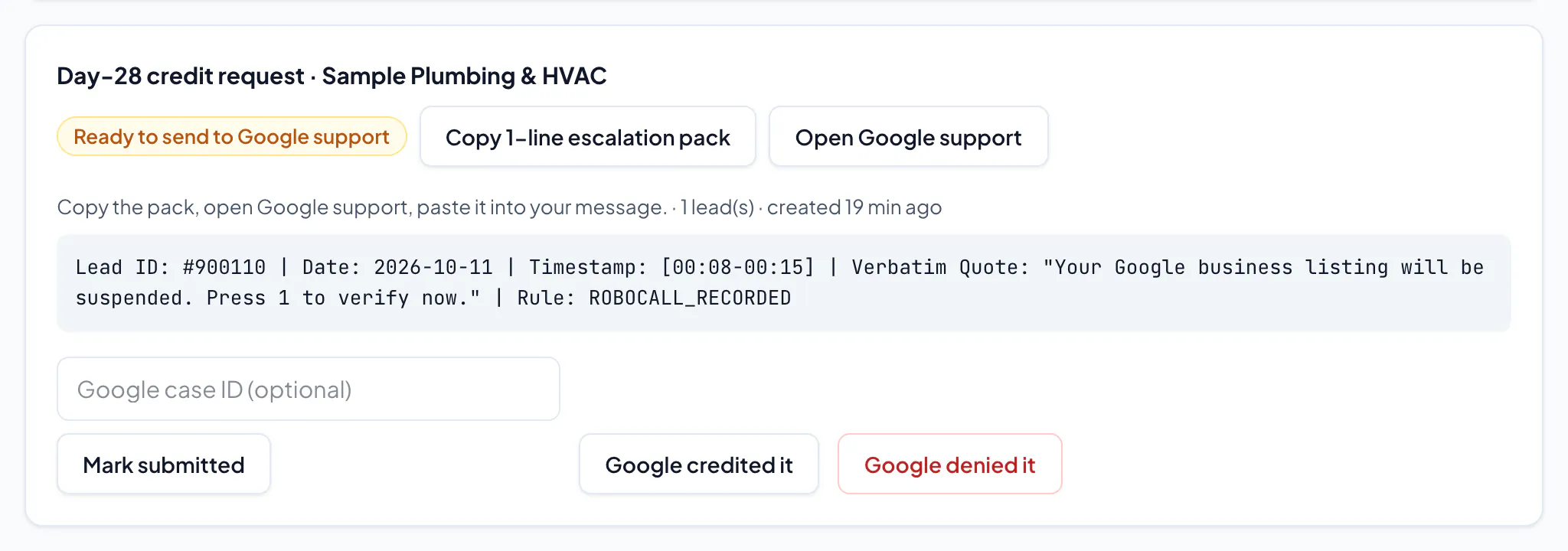
- Copy 1-line escalation pack copies the lead ID, date, timestamp, masked quote and rule in one line.
- Open Google support and paste it into your request.
- Add Google’s case ID if you have one, then click Mark submitted.
- When Google answers, record it: Google credited it, or Google denied it.
Starter shows the same deadline warnings and explains how to reach Google support, without the packs. See plans and billing.
Frequently asked
Can someone in my Slack channel approve a claim without a CallWarden login?
Yes. A team-channel alert carries a one-time link that anyone in the channel can use to approve that claim, copy a Day-28 pack or resume paused campaigns. Links expire within 24 hours and never cover billing or settings.
What does Autopilot never do on its own?
It never rates a lead below your confidence threshold, never claims within the 24-hour hold, and never sends good-lead ratings in Co-Pilot. It can't change your budgets, bids or targeting in any mode.
Google approved the claim. When do I see the money?
Google issues approved credits in about two months, on your Google Ads invoice. CallWarden shows Google's answer on the lead right away and marks the lead credited when Google's records change.
Still stuck?
Email us and an engineer replies within one business day. Include the lead ID or the Google Ads account name and we can look at exactly what happened.