Understanding your 30-day audit
What CallWarden flags and why: 15-day repeat callers, calls under 15 seconds, missed calls Google bills since October 2026, spam messages, and calls that need a listen. Plus the 24-hour hold and the 30-day window.
Checked against the product on · 6 min read
The two buckets on your Overview
| Bucket | What’s in it | What you need |
|---|---|---|
| Ready right now | Repeat callers within 15 days, calls under 15 seconds, missed calls in the 20 to 25 second band, spam message leads | Nothing. The evidence is in the lead data itself. Works on your phone. |
| Waiting for audio inspection | Calls between 15 seconds and 2 minutes where someone spoke | The Chrome Audio Bridge on an office computer, so our AI can hear whether it was a sales pitch, wrong trade or job seeker. |
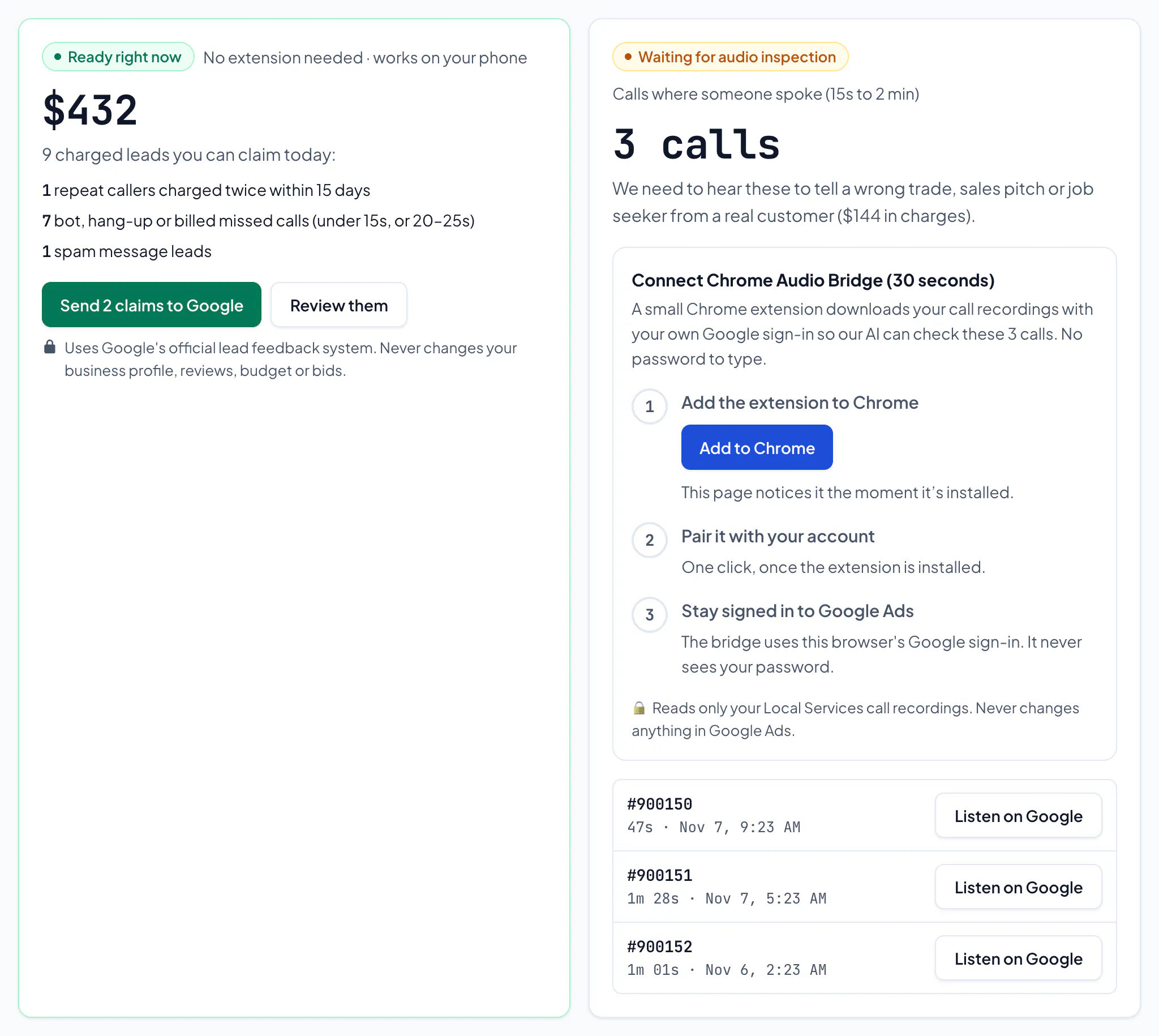
- Ready right now: the amount you can claim today and the flags behind it.
- Review them opens the Leads page filtered to these leads. When claims are waiting for approval, a green button sends them.
- Waiting for audio inspection: calls between 15 seconds and 2 minutes that need a listen.
- Listen on Google plays the recording in Google Ads, if you’d rather decide yourself.
What each flag means
Repeat caller (duplicate)
Google charges for a customer once per 15 days. When the same phone number (plus the same extension, for Google tracking numbers) is charged twice inside that window, the later lead is a duplicate. CallWarden links the two and rates the later one. Details in the 15-day duplicate rule guide.
Hung up in seconds
Calls under 15 seconds are robocalls, misdials or hang-ups: nobody could have asked for service. They’re flagged as spam.
Missed call Google still bills
Since October 1, 2026, Google charges for a missed call once it rings for 20 seconds. Missed calls in the 20 to 25 second band with no conversation are flagged, because that pattern is how spoofed call floods look. See the missed-call charge guide.
Spam message leads
Message leads that read as sales pitches or job applications are flagged from the text. Phone numbers, emails and addresses in the text are masked when we store it.
Calls that need a listen
A 40-second call could be a real customer or a vendor pitch. With the Chrome Audio Bridge, CallWarden transcribes the call, masks personal details, and shows you the verdict with the exact quote and timestamp. Without it, tap “Listen on Google” and decide yourself.
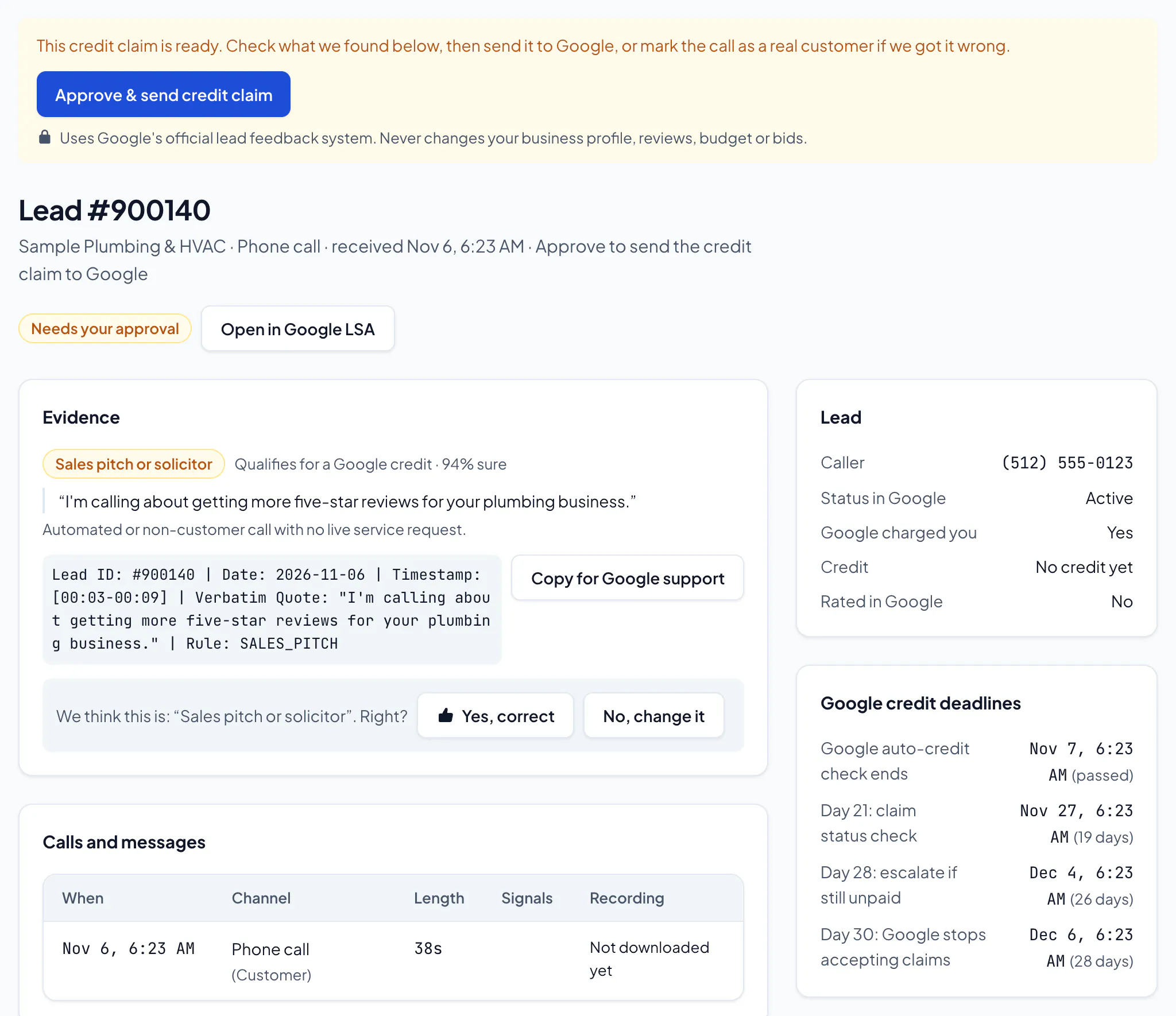
- Approve & send credit claim sends Google’s own “Rate this lead” feedback for this lead.
- The flag, and how sure CallWarden is that Google’s rules cover it.
- The exact words from the call, with personal details masked. The evidence line below it has the timestamp.
- Yes, correct or No, change it: tell us when the verdict is wrong.
- Google’s dates for this lead: the 24-hour check, Day 21, Day 28 and Day 30.
Not covered by Google’s credit rules
Google no longer credits leads from outside your service area or for job types you don’t offer. CallWarden labels these “fix in targeting” rather than filing a claim Google will decline. Adjust your service areas and job types in Google Ads.
The 24-hour hold
Google reviews new leads itself and credits some automatically within the first day. CallWarden waits 24 hours after each lead, re-reads its credit status from Google, and only then lines up a claim for leads Google didn’t credit. That way you never claim a credit you were already getting.
The 30-day window, Day 21 and Day 28
- Day 21: CallWarden re-checks every claimed lead’s credit status.
- Day 28: on Shield and Agency, leads still uncredited get a one-line evidence pack for Google Local Services support, and you’re alerted. See Day-28 escalation packs.
- Day 30: Google’s window closes. The Overview warns when flagged leads are within 7 days of it.
Telling us when we got it wrong
Every verdict has a thumbs-up and an override. Overrides change what happens to that lead, and they reach our team so the classifier improves. Nothing about you or your callers is included in what our team sees beyond the masked verdict text.
Frequently asked
Why does CallWarden wait 24 hours before claiming a credit?
Google reviews new leads itself and credits some automatically in the first day. Waiting 24 hours and re-checking avoids claiming a credit Google is already giving you.
A lead is flagged but I know the caller was real. What do I do?
Open the lead and use the thumbs-down on the verdict, or simply don't approve the claim. Nothing is sent to Google without your approval in Co-Pilot mode.
Why is a lead marked as not covered by Google's credit rules?
Google stopped crediting leads that are outside your service area or job types. CallWarden labels those so you can fix the targeting in Google Ads instead of filing a claim Google will decline.
Still stuck?
Email us and an engineer replies within one business day. Include the lead ID or the Google Ads account name and we can look at exactly what happened.