Alerts, team channels and quiet hours
Where CallWarden alerts go (email, Slack, Microsoft Teams, Discord, phone push), which alerts break through quiet hours, how one-tap links work, and the monthly statement for your bookkeeper.
Checked against the product on · 4 min read
Setting up a channel
Settings > Integrations lists each channel with a “Send test alert” button.
| Channel | What you need | Notes |
|---|---|---|
| Slack | Click Add to Slack and pick a channel (or paste a webhook URL from your own Slack app) | Alerts arrive from the CallWarden app as a card with a color bar: green for money recovered, amber for things to review, red for floods and deadlines. Caller numbers show only their last four digits. Some workspaces need a Slack admin to approve new apps. |
| Microsoft Teams | A Workflows webhook URL (Post to a channel when a webhook request is received) | Adaptive Card with the same actions. |
| Discord | A channel webhook URL | Embeds, with mentions turned off. |
| Phone push | The free ntfy app and a topic name you choose | Treat the topic name like a password; anyone who knows it can read the alerts. No action links are sent to ntfy. |
| Nothing | Owners and admins get alerts; each person picks their own events in Settings > Notifications. |
Webhook URLs are stored encrypted and never shown again in full; the settings page shows only a hint so you can tell channels apart.
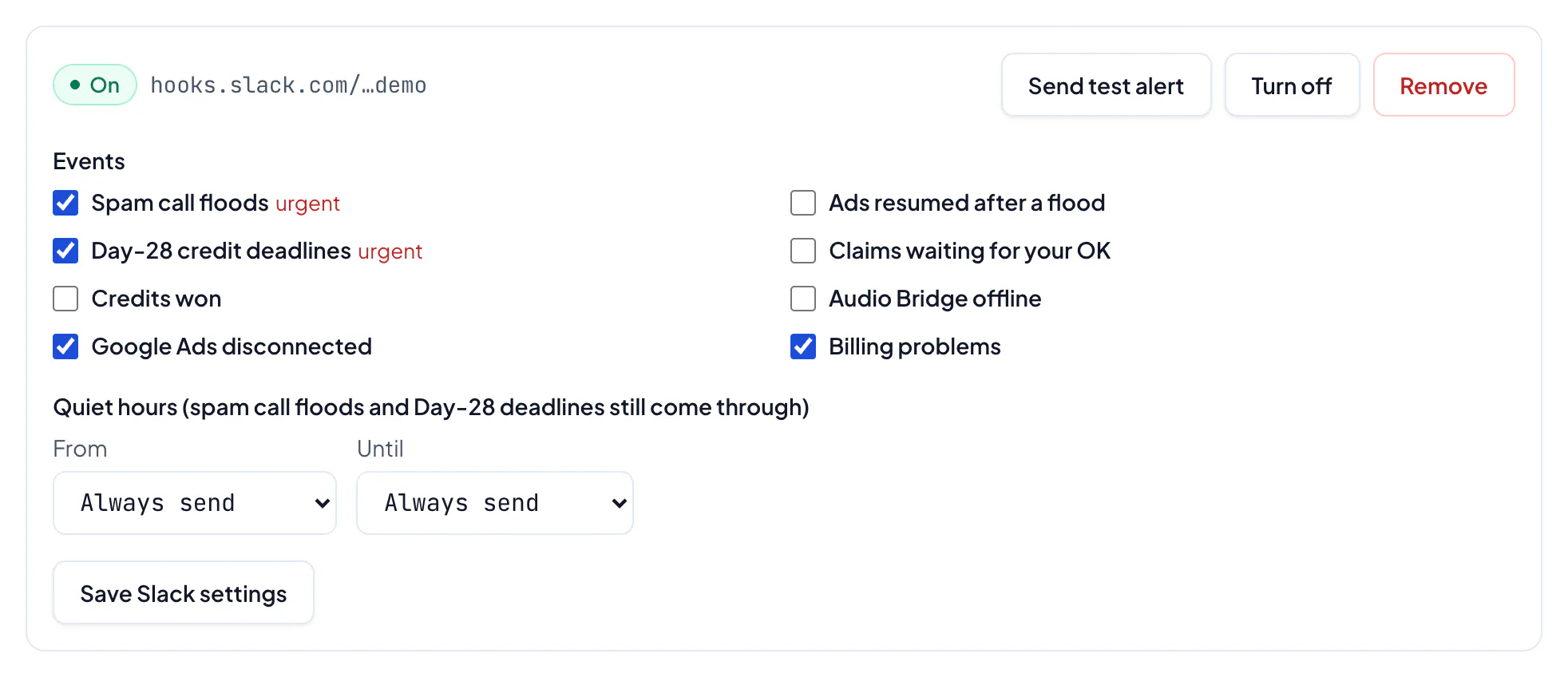
- The channel is on. Only a hint of its webhook address is shown; the full address is stored encrypted.
- Send test alert posts a sample alert to the channel. Turn off and Remove are next to it.
- Events: what this channel receives. Urgent ones are marked.
- This channel’s own quiet hours. Spam call floods and Day-28 deadlines still come through.
Which events, and when
- Urgent, always through: a spam flood (ads paused, or couldn’t be paused) and a Day-28 deadline within 48 hours.
- Waits for quiet hours to end: claims awaiting approval, Google’s answers, credits recovered, Audio Bridge offline, payment problems.
- Each channel has its own list of events and its own quiet hours, in your business’s time zone. Email uses the business’s quiet hours too.
One-tap links
Every link opens a confirmation page, so opening a preview can’t act. Links in a team channel last at most 24 hours, cover only approvals, Day-28 packs and resuming campaigns (never billing or settings), and stop working if the channel is removed or turned off. Links in email are personal to the recipient. More in Co-Pilot and Autopilot.
The monthly statement
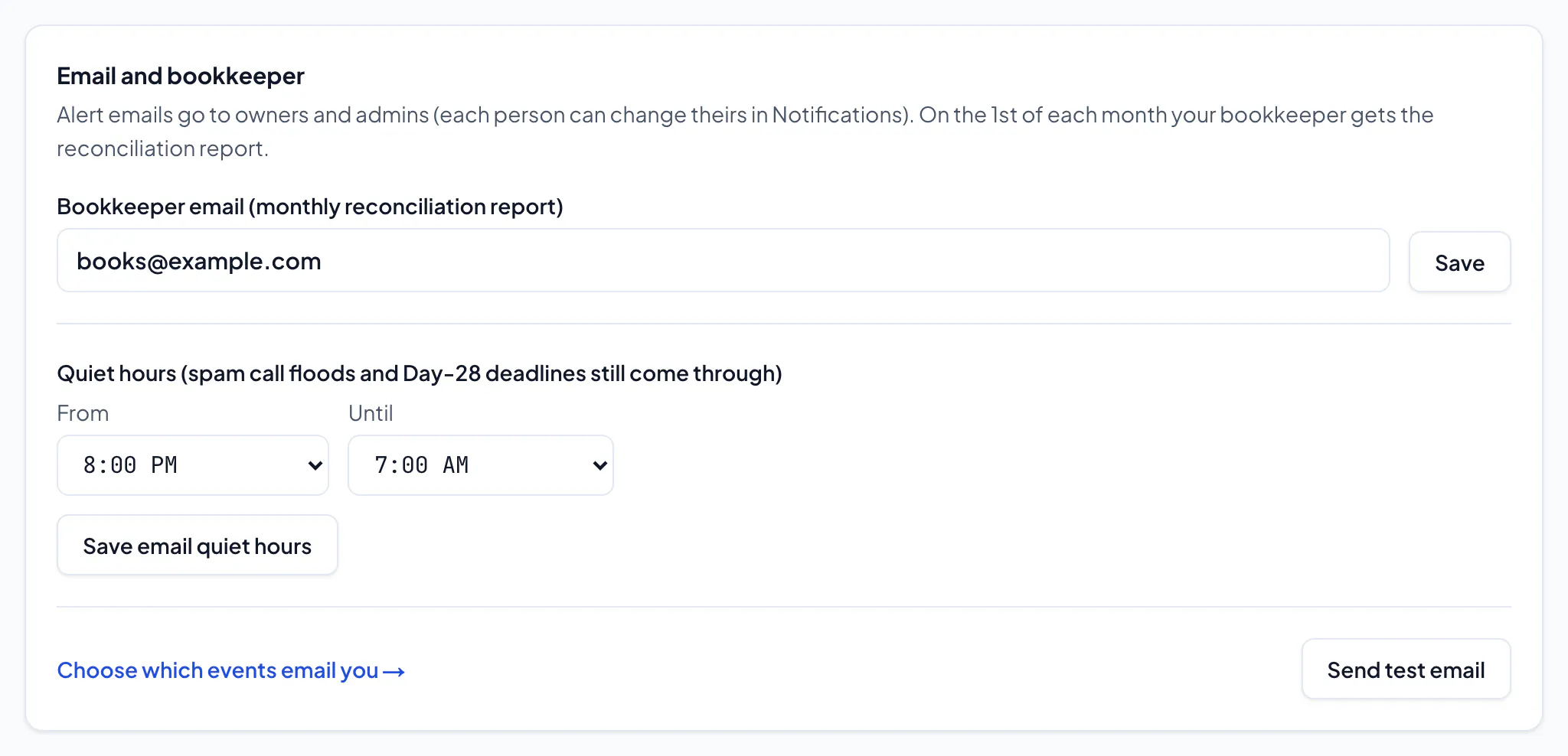
- Your bookkeeper’s address. They get a copy of the monthly statement on the 1st.
- Quiet hours for alert emails, in your business’s time zone.
- Choose which events email you: your own choices; teammates set theirs.
- Send test email sends a sample alert to your own address.
Seeing what was sent
Settings > Notifications > Recent notifications lists everything CallWarden sent, with delivery status, so you can check a missing alert before writing to us.
Frequently asked
Can CallWarden text me?
Not yet. Text alerts with reply-to-approve are coming soon. Today alerts go by email, to your team channels, and as phone push notifications through the free ntfy app.
Who receives alert emails?
Owners and admins by default. Each person chooses which events reach them in Settings > Notifications; teammates' choices are their own.
Why isn't Slack one of my choices in Settings > Notifications?
Team channels are shared by everyone in them, so they aren't personal choices. An owner or admin picks which alerts each channel gets in Settings > Integrations. Settings > Notifications shows, under each alert, which channels it also posts to.
Will a spam flood alert wake me up?
Yes, if you want it to. Spam floods and Day-28 deadlines are urgent and go through quiet hours; everything else waits for the morning.
Still stuck?
Email us and an engineer replies within one business day. Include the lead ID or the Google Ads account name and we can look at exactly what happened.